For many people, your church website is the first place they “visit” before they ever walk through your doors. Someone new to the area, a family looking for a church home, or a member checking this week’s schedule all want the same thing: to find what they need quickly, usually on their phone.
Use this checklist to see what your church website already does well and what might be missing.
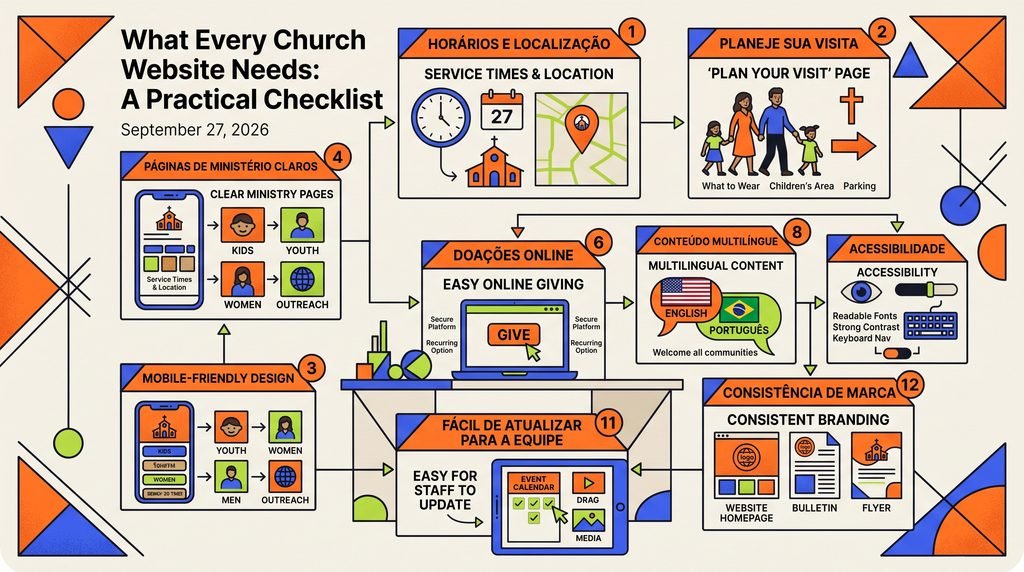
1. Service times and location, front and center
This is the number one reason people visit a church website. Put your service times, address, and a link to directions at the top of the homepage, not buried on an “About” page. Include parking information and which entrance to use if your building is hard to find.
2. A “Plan Your Visit” page
First-time visitors often feel nervous. A dedicated page that answers their questions can make the difference between staying home and showing up. Consider including:
- What a typical service looks like and how long it lasts.
- What people usually wear.
- What’s available for children and youth.
- Where to park and where to go when you arrive.
- Who to contact with questions.
3. A mobile-friendly design
Most people look up churches on their phones, often on the way to a service. Text should be easy to read without zooming, buttons should be easy to tap, and key information like service times, directions, and phone number should be one tap away.
4. Clear ministry pages
Give each ministry, such as kids, youth, small groups, women’s, men’s, or outreach, a short page or section with who it’s for, when and where it meets, and who to contact. Keep it simple and easy to scan.
5. An up-to-date events calendar
Nothing makes a website feel abandoned faster than an event from last year. Make sure past events come off the site and upcoming ones are easy to find. If updates are hard to keep up with, that’s a sign your site needs a simpler system or ongoing help.
6. Easy online giving
Many members now prefer to give online. Add a clear “Give” button in your main menu and connect it to a secure giving platform. Briefly explain the ways people can give, including in person, online, and recurring.
7. Sermons and media
If you record sermons, make them easy to find and organize them by date or series. This helps members who missed a Sunday and gives visitors a sense of your church before they come.
8. Content in the languages your community speaks
If your congregation includes English- and Portuguese-speaking families, or other language communities, consider bilingual pages for the most important information: service times, Plan Your Visit, events, and contact. Visitors feel welcome when they can read about your church in their own language.
9. Accessibility
Your website should be usable by everyone, including older members and people with disabilities. Use readable font sizes, strong color contrast, descriptive text for images, and navigation that works with a keyboard.
10. A way to get in touch
Include a simple contact form, phone number, and email address. Consider a prayer request form or a “Connect” card for new visitors who want to take a next step.
11. An easy way for staff to update it
The best church websites are the ones that stay current. Your staff and volunteers should be able to update service times, events, and announcements without calling a developer every time.
12. Consistency with your other materials
Your website, bulletins, flyers, banners, and social media should look like they come from the same church. Consistent colors, fonts, and messaging make your church easier to recognize and your announcements easier to trust.
How does your church website measure up?
If your site is missing several items on this list, you’re not alone. Many churches run on websites that were built years ago by a volunteer and never updated. At MultiCoreDesign, we help churches in San Diego create clear, mobile-friendly, bilingual websites and matching communication materials.
Tell us how your church communicates today, and we’ll recommend a practical next step.